





Arthur teaches. You decide what he is allowed to teach.
ArthurAI™ FLE is the Family Learning Edition of the Agentic Learning Operating System, for families teaching at home. Each child gets their own space with Arthur, a Digital Employee who tutors and shows his working. You get the controls, every conversation to read, and Eve to make changes for you — only when you press Confirm.
$19 per learner / month or $190 per learner / year (save $38) · 7-day free trial, card needed to start · plus applicable tax · Children's privacy notice
Photo help, voice and read-aloud stay off until you turn them on.
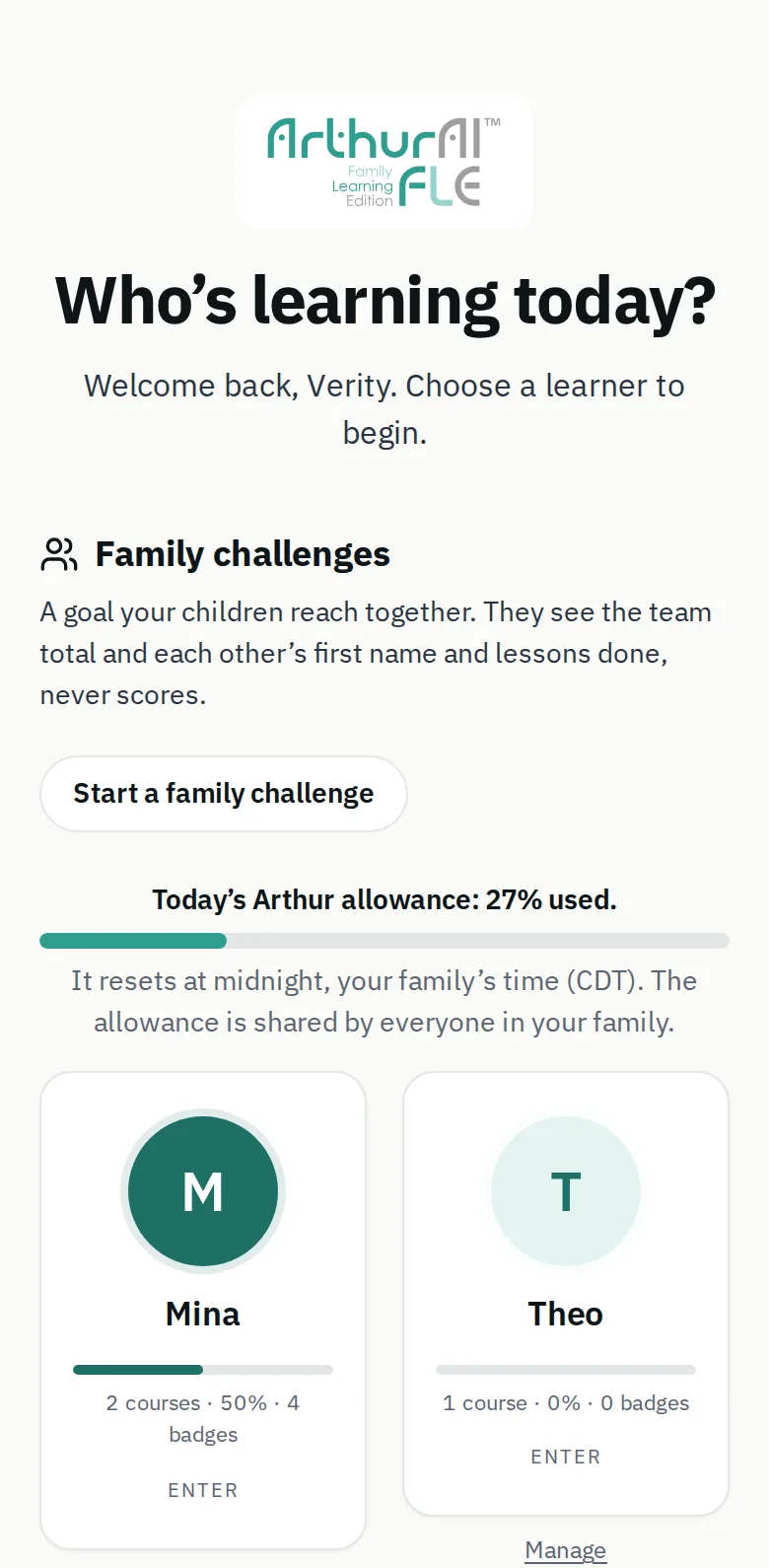
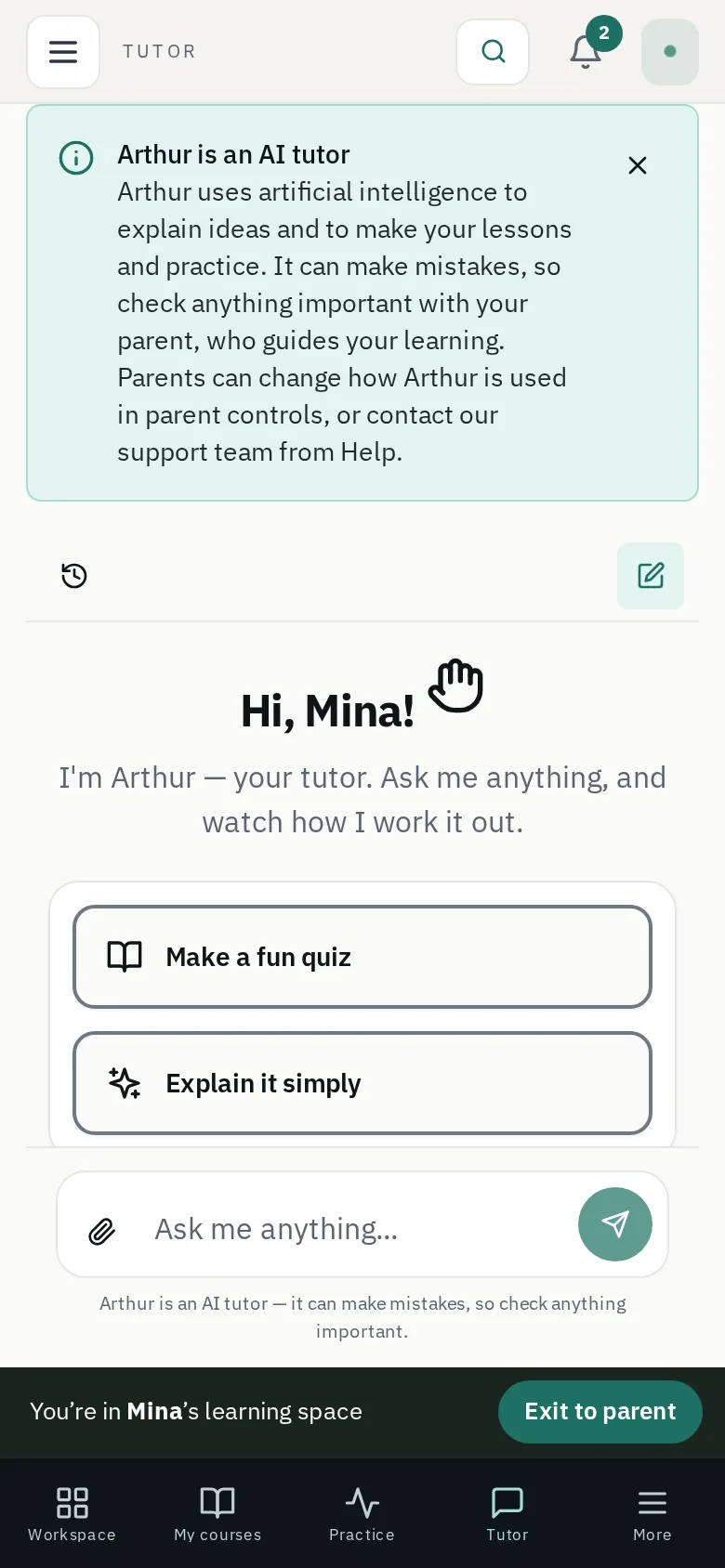
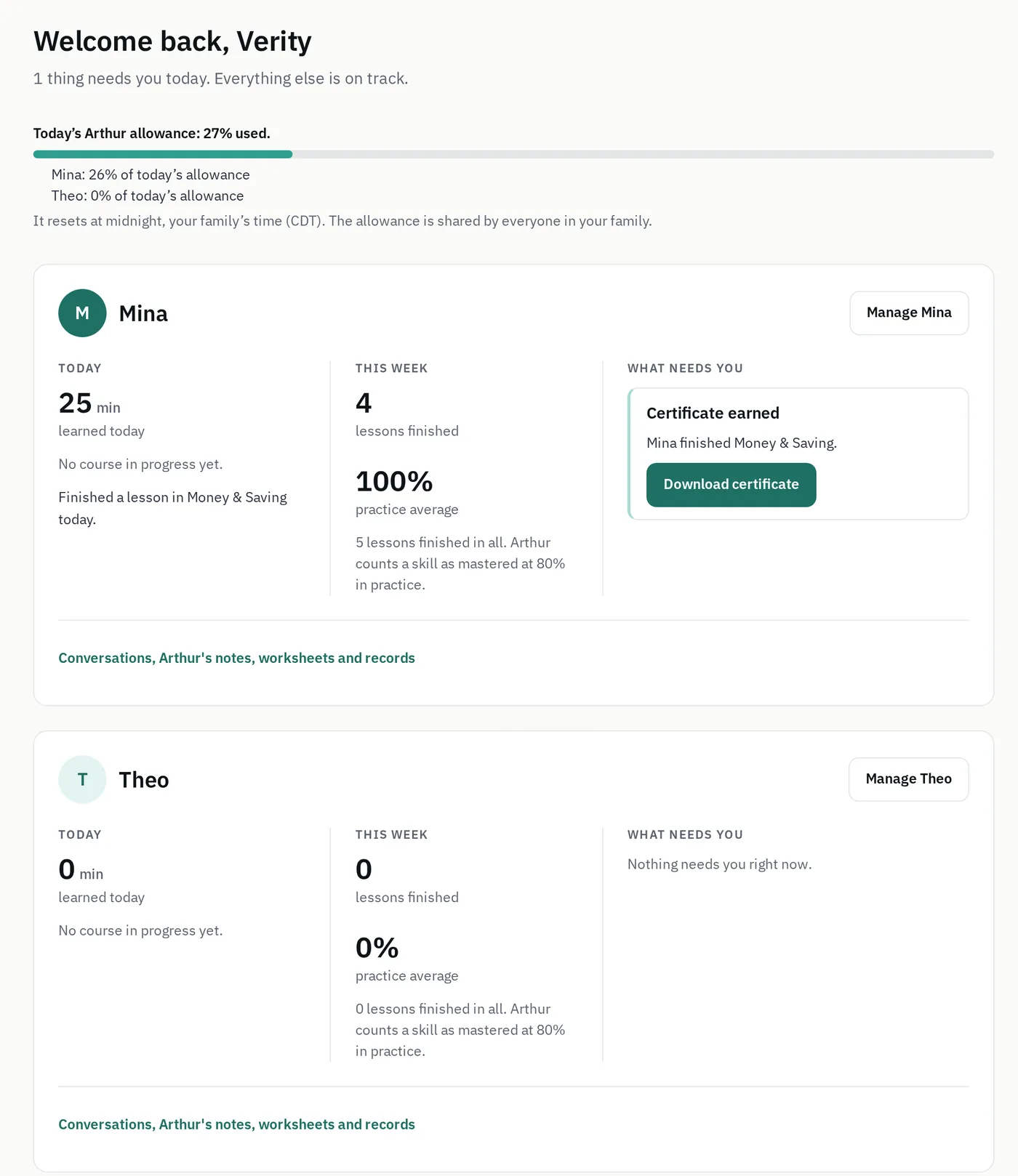
One card for each child.
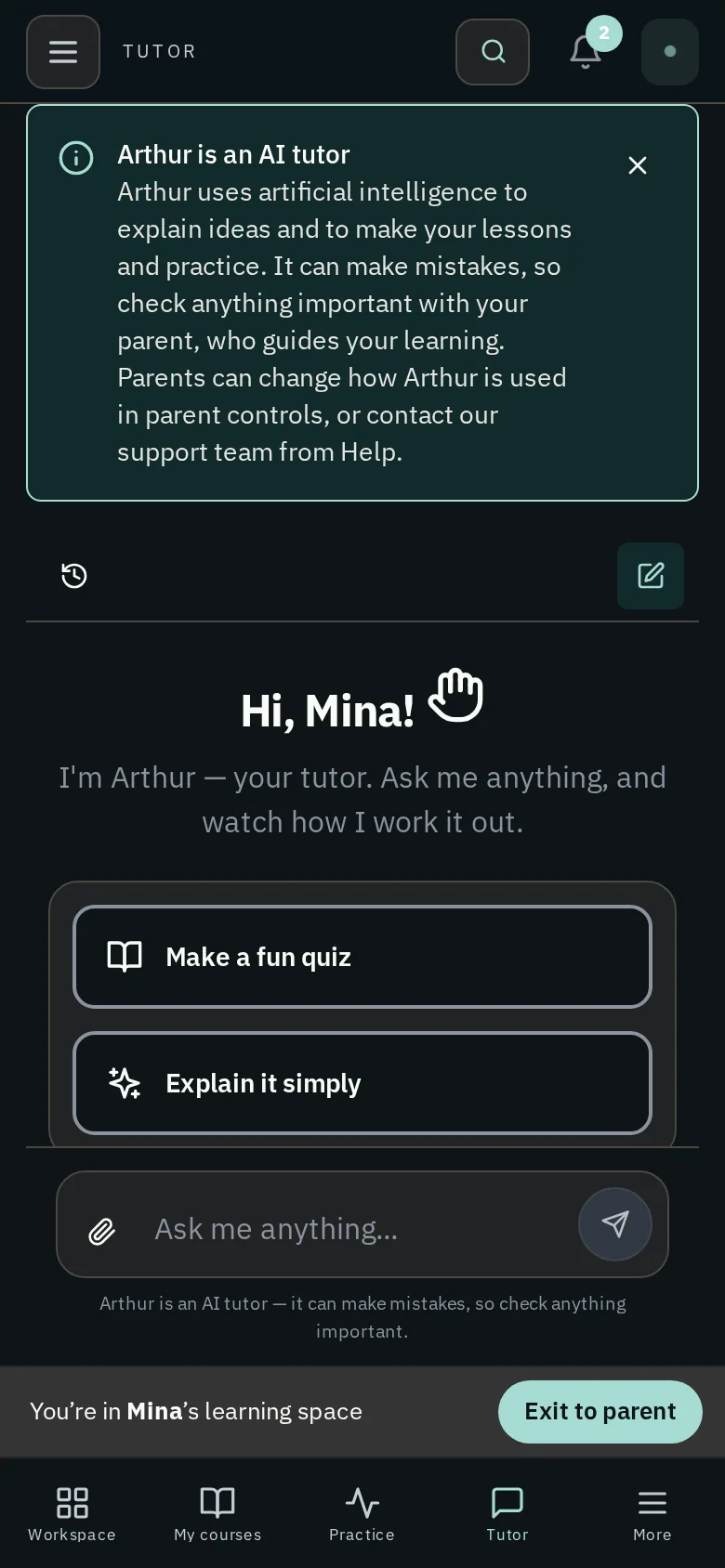
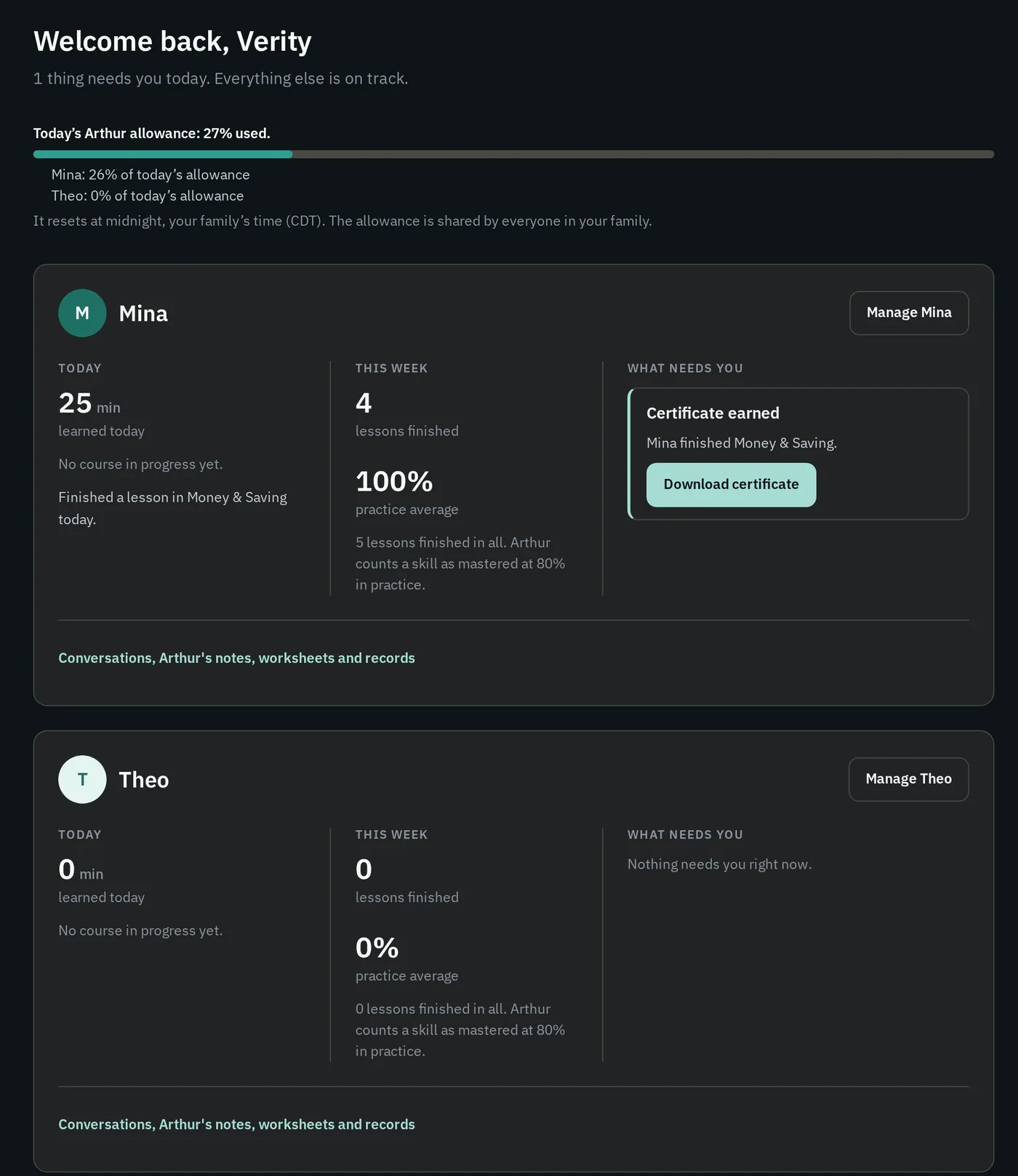
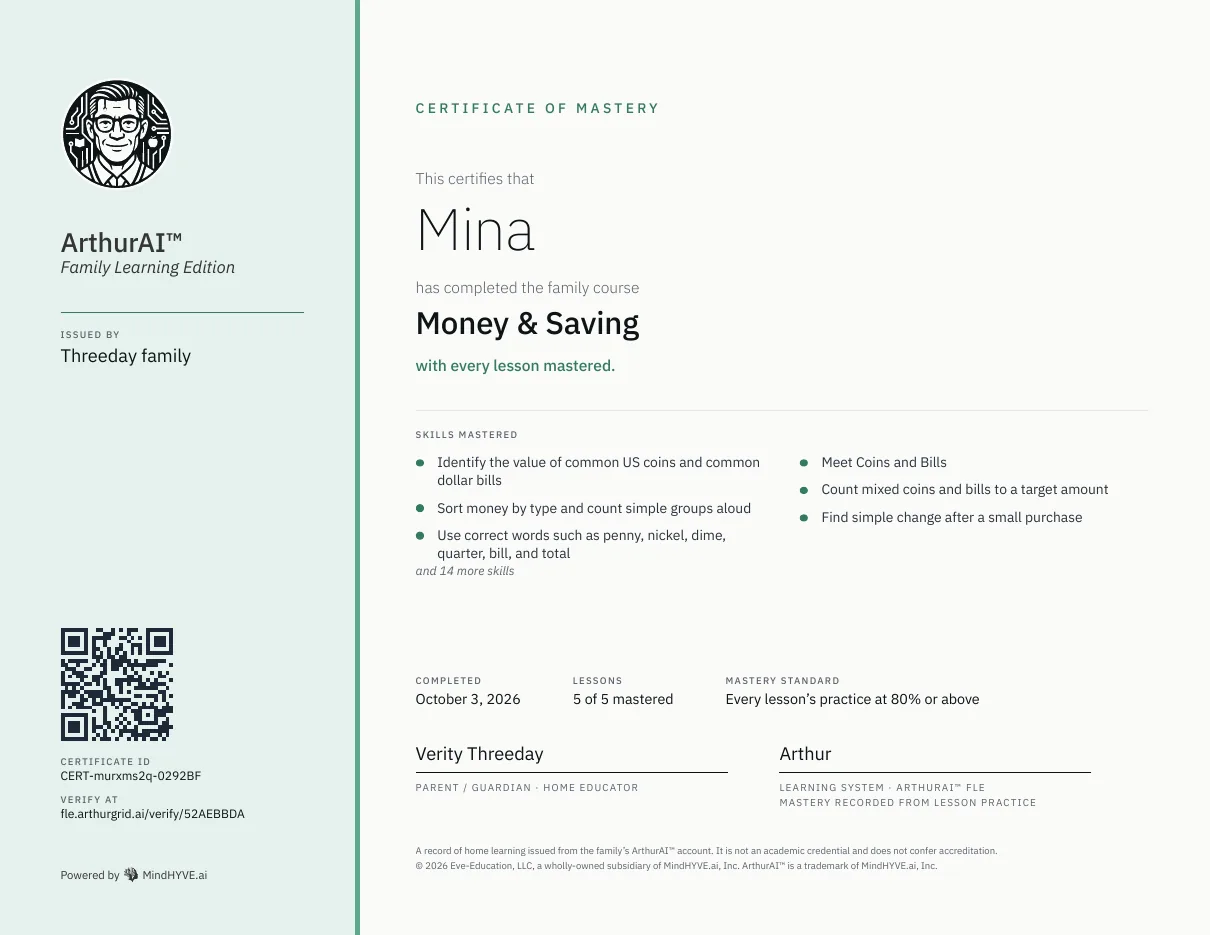
Each card shows time today, lessons this week and anything that needs you, with the conversations a click away. Light or dark, your choice: set it in Settings, Appearance. When a child finishes a course, the certificate is one button away, and you can download it as a PDF.
The parent is the faculty, and the product is built that way.
Families teaching one child or several, across year groups, at home. The account holder is a parent or guardian; the learners are their children, each on their own profile.
Every other ArthurAI™ edition assumes either an institution behind the learner or a learner buying for themselves. FLE is the one where the person paying is accountable for someone else's education — so it is the one that gives them the record and the boundaries, not just the login.
Runs in the browser on any device. Nothing to install.
Four things a general-purpose model will not give a parent.
Anyone can put a child in front of a general-purpose AI and ask it to explain fractions. What that does not give you is an off switch you actually control, a record of every conversation, replies checked for children before they are shown, or a tutor that shows how it got the answer. FLE is built around each of those.
- You set the boundaries
Each child has their own controls, and you hold them
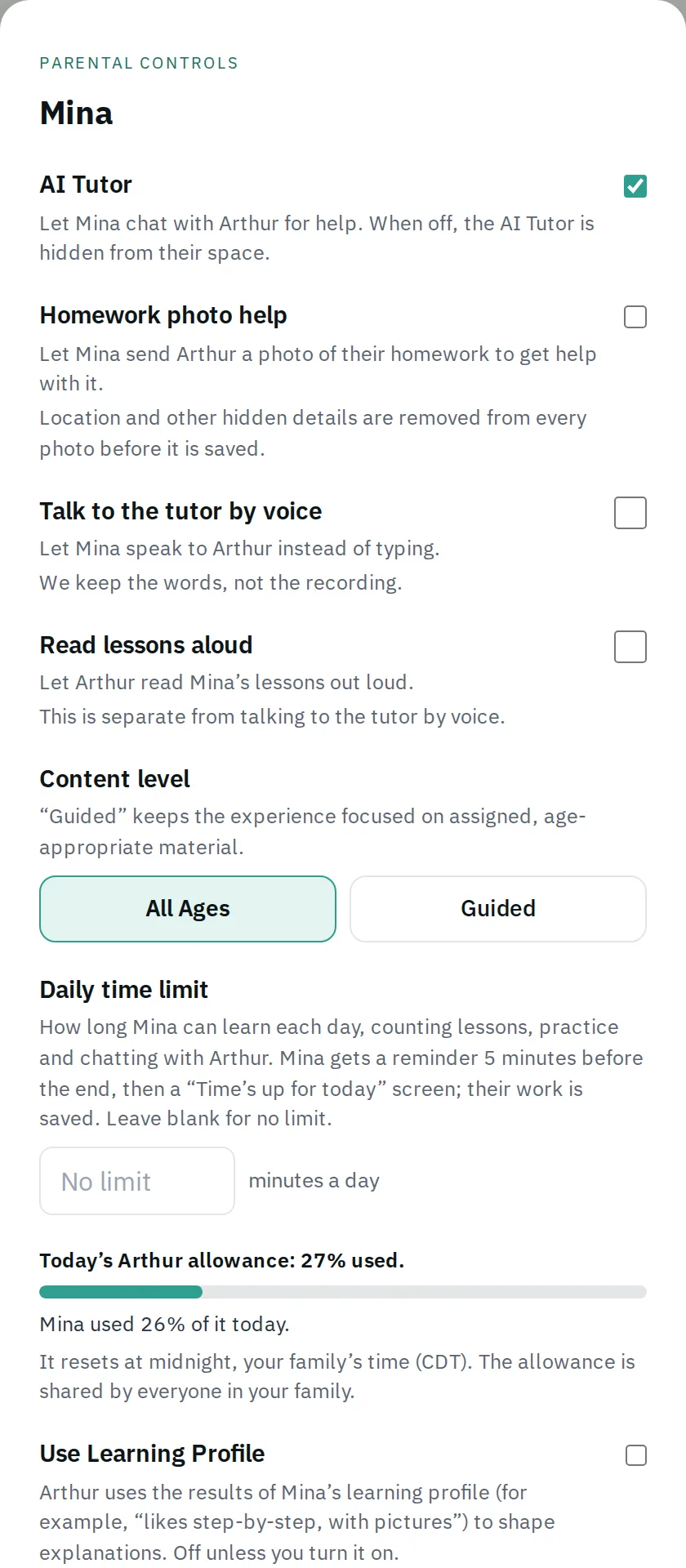
For every child you decide whether the AI tutor is available at all, how many minutes a day they can learn, and what content level they work at. Homework photo help, talking to the tutor by voice and lessons read aloud are all off until you turn them on for that child. When the daily limit is nearly up, your child gets a five-minute reminder, then a calm "Time’s up for today" screen, and their work is saved.
- Nothing hidden from you
Read every conversation your child has with Arthur
The parent dashboard has one card for each child, showing their time today, their lessons this week and anything that needs you, with their conversations a click away. Open any conversation and you read the full exchange, read-only, exactly as your child saw it. If you turn on the learning profile, you can see what Arthur has noticed about how your child learns and erase any of it.
- Built for children
Every reply is checked before your child sees it
Arthur’s answers to children are screened for safety before they appear. If a child asks for something inappropriate, Arthur steers back to learning calmly. If something a child writes suggests they may not be safe, Arthur gives them age-appropriate places to get help, and the concern is flagged for follow-up.
- Shows the working
A tutor that works it out with your child
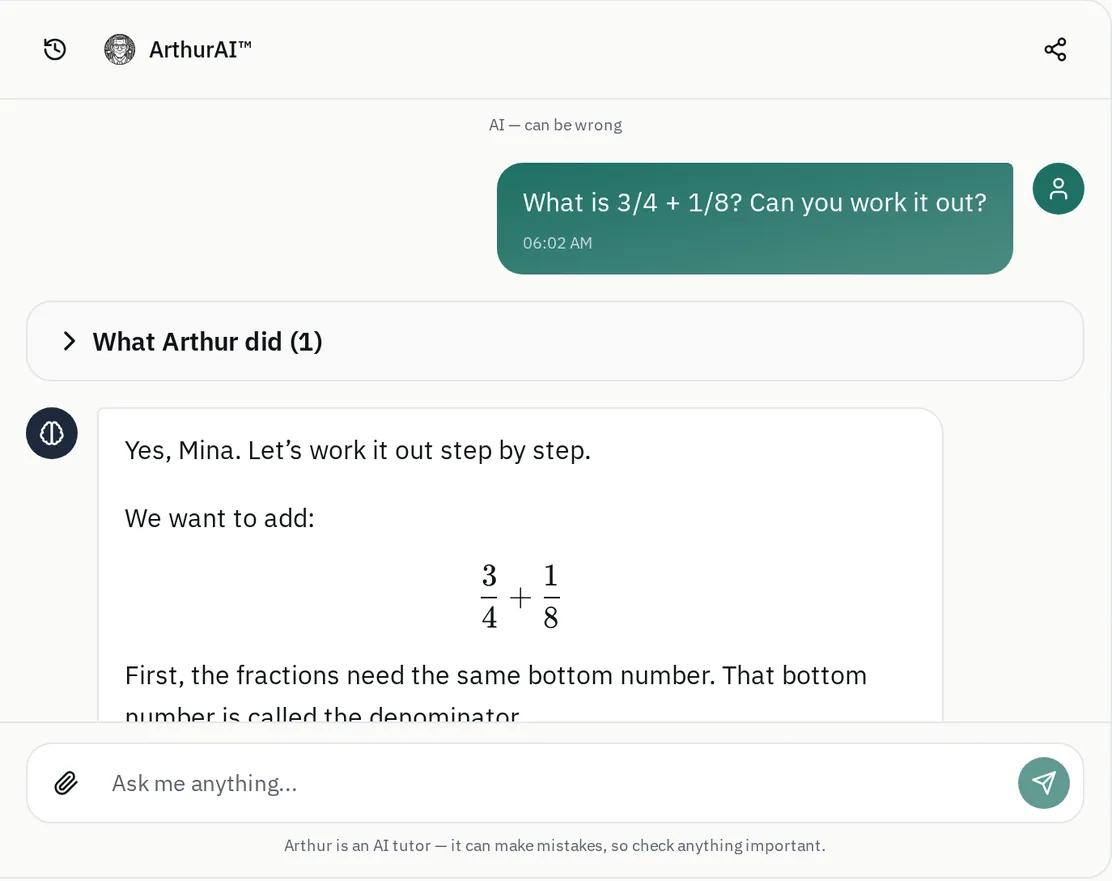
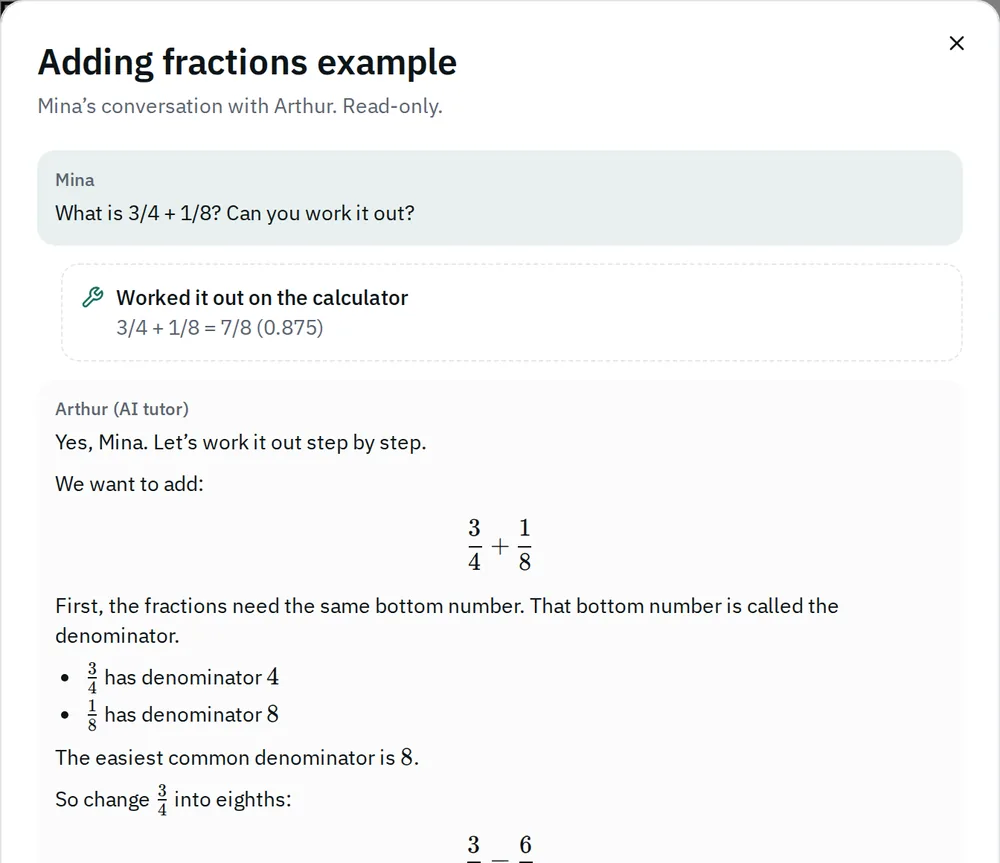
Arthur shows what he did and how he thought about it — working out a sum on the calculator, drawing a diagram, making a short quiz or a set of flashcards — so your child follows the reasoning instead of copying an answer. The tutor screen says plainly that Arthur is an AI tutor and can make mistakes.
Set the rules for each child, or ask Eve to do it.
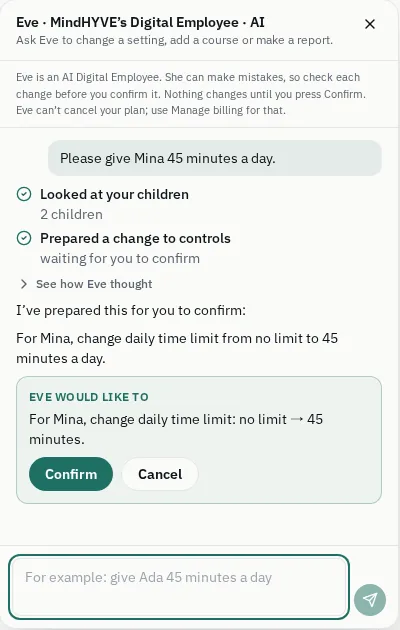
Every child has their own controls. Open them yourself, or tell Eve what you want in plain words. Eve is the Digital Employee on the parent side: she prepares the change, shows you exactly what it will be, and waits. Nothing changes until you press Confirm, and Eve never cancels your plan.
Built for children, with the parent able to see everything.
- Homework photo help, talking to the tutor by voice and lessons read aloud are each off for every child until you turn them on.
- Location and other hidden details are removed from every homework photo before it is saved.
- Arthur’s replies to children are checked for safety before your child sees them. Asked for something inappropriate, he answers calmly and returns to learning.
- If something a child writes suggests they may not be safe, Arthur shows age-appropriate places to get help, and the concern is flagged for follow-up.
- You can read every conversation your child has with Arthur, in full and read-only.
- The learning profile is off unless you turn it on, and you can read and erase what it holds.
- No advertising cookies or trackers in FLE.
The Children's Privacy Notice sets out what FLE collects about children, how you give consent, who can read conversations, how long information is kept and how to delete it. FLE is a learning product; it does not replace a parent, a doctor or emergency services.
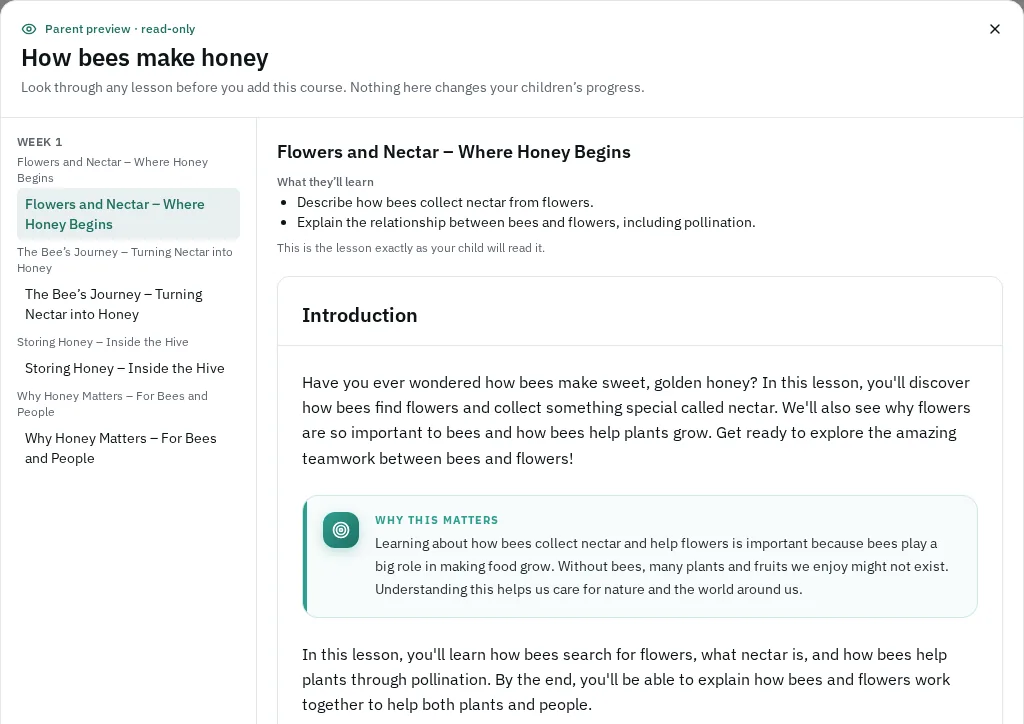
Your child loves bees? Ask Arthur for a course on bees.
Describe a topic and Arthur builds three to five short lessons, checking every one before you see it. You read each lesson first, then approve the course for the children you choose. Up to three a month are included.
Practice brings back what your child missed, and you can print a weekly worksheet pack with its own answer key.
Everything included, monthly or annual.
Everything below is in the live product today, on every plan. The first three groups are for you; the rest is what your child learns with.
Controls you hold, per child
- The AI tutor on or off for each child
- A daily time limit, with a five-minute reminder and work saved at the end
- A content level per child
- Homework photo help, voice and read-aloud, each off until you turn it on
- A parent PIN between a child’s space and the controls
What you can see
- A parent dashboard with each child’s time today and progress
- Every tutor conversation, readable in full
- An opt-in learning profile you can read and erase
- Progress downloads as PDF or spreadsheet
- A daily allowance meter shared across the family
Eve, on the parent side
- Ask Eve to change a child’s settings in plain words
- Every change shown in plain words before it happens
- Nothing changes until you press Confirm
- Eve never cancels your plan
Arthur, your child’s tutor
- Shows what he did and how he thought about it
- Works sums out on a calculator and draws diagrams
- Makes short quizzes and flashcards on request
- Looks through your child’s course material from inside a lesson
- Replies to children checked for safety before they are shown
Courses and practice
- Ask Arthur to make a course: 3–5 lessons, checked, previewed by you first
- Practice that brings back what your child missed
- Weekly worksheet packs with answer keys
- Certificates for finished courses
- Family challenges: first names and lessons done, never scores
- Import courses you authored in ArthurAI™ Studio
The account
- Runs in the browser on phone, tablet or computer
- Monthly or annual plan, 7-day free trial on both
- Change card, see invoices or cancel in Manage billing
- Help articles, support tickets and My Tickets
From setting the rules to seeing where each child is.
The shape of it in the order a parent meets it — set up the children and their boundaries first, because in this edition that comes before anyone opens a lesson.
- Setting up
Create your account and add each child
Sign up at fle.arthurgrid.ai, add a profile for each child with your consent, and set a parent PIN so the controls are not one tap away from a curious eight-year-old. Then choose monthly or annual. The first seven days are free on either plan; a card is needed to start.
- Deciding the rules
Set each child’s controls
Per child: the AI tutor on or off, a daily time limit or none, the content level, and whether to allow homework photos, voice or read-aloud. You can also ask Eve, the Digital Employee on the parent side, to make a change for you. She shows the change in plain words and nothing happens until you press Confirm.
- Every day
Your child learns in their own space
From the “Who’s learning today?” screen, tap a child to open their space — their courses, practice and tutor, on a phone, tablet or computer. Getting back to the parent side needs your PIN. Progress shows as bars, milestones and badges. There are no leaderboards and no streaks to lose.
- When you want more
Ask Arthur to make a course on any topic
Describe a topic and Arthur builds three to five short lessons, checking every one before you see it. You read the lessons first, then approve the course for the children you choose. You can make up to three of these a month. Family challenges let siblings work towards a goal together, seeing only each other’s first names and lessons done.
- Keeping track
Worksheets, exports and certificates
Print a weekly worksheet pack with its own answer key. Download a child’s progress as a PDF or a spreadsheet file. Finishing a course earns a certificate that you or your child can download as a PDF and that anyone can check on a public verify page. It is a record of home learning, not an academic credential. If you need help, raise a support ticket from Help and follow it in My Tickets.
Build your own lessons with ArthurAI™ Studio.
Want a course that is not in the catalogue — your family's own history unit, a deeper run at the maths your child is stuck on? Write a brief in ArthurAI™ Studio and it authors the complete course.
Export it from Studio for an ArthurAI™ edition and import it into FLE from your Courses page. It arrives as a draft, ready for you to review and publish.
The questions parents ask.
Straight answers on the tutor off switch, keeping children out of the controls, whether siblings share a login, and what happens to your children's data. Where the controlling document is the Privacy Policy — or where the answer is properly 'that is your responsibility, not ours to claim' — the answer says so.
How much does ArthurAI FLE cost?
US$19 per learner a month, or US$190 per learner a year, which saves US$38. Both plans start with a 7-day free trial, and a card is needed to start it. Sales tax is added at checkout where it applies. Your plan follows the number of children on the account, with the difference prorated, and you can change your card, see invoices or cancel in Manage billing.
Who is FLE for?
Families teaching at home, or supporting learning at home. The account holder is a parent or guardian, and each child has their own profile on the one account. If you are studying for yourself, PLE is the edition built for that; schools, universities, vocational providers and employers have their own editions.
Can I stop my child using the AI tutor?
Yes, per child. When the AI tutor is off for a child, it is hidden from their space. You can switch it on or off at any time, and the other children on the account are not affected.
Are photos and voice switched on?
Not until you switch them on. Homework photo help, talking to the tutor by voice and lessons read aloud are each off for every child until a parent turns them on in that child’s controls. Location and other hidden details are removed from every homework photo before it is saved.
Can I see what my child says to Arthur?
Yes. The parent dashboard lists each child’s recent conversations with Arthur, and you can open any of them to read the full exchange. It is read-only, so you see exactly what your child saw. The Children’s Privacy Notice explains who else can read conversations and when.
Can my teenager have their own sign-in?
Yes, for a child aged 13 or over. In that child’s controls you give them a username and a password you choose, and they sign in to their own space to learn and see their own progress. You keep all the controls and can switch the sign-in off at any time. The option is not offered for a child under 13, and a child’s sign-in does not open the parent side.
Is there a dark mode?
Yes. In Settings, under Appearance, choose Light, Dark or Device, which follows your phone or computer. The choice is remembered on that browser.
What happens if my child types something worrying?
Arthur’s replies to children are checked for safety before they are shown. If a child asks for something inappropriate, Arthur answers calmly and returns to learning. If what a child writes suggests they may not be safe, Arthur shows age-appropriate places to get help and the concern is flagged for follow-up. FLE is a learning product and does not replace a parent, a doctor or emergency services.
What does Eve do?
Eve is the Digital Employee on the parent side. Ask her to change a child’s settings — for example, “give my daughter 45 minutes a day” — and she prepares the change and shows you exactly what it will be. Nothing changes until you press Confirm, and Eve cannot cancel your plan; Manage billing is where you do that.
How do you keep a child out of the parent controls?
A parent PIN. Leaving a child’s learning space to get back to the parent side asks for it, so changing the rules is not something a child can do by tapping around. You can change or remove the PIN yourself.
Does ArthurAI replace me as the teacher?
No. Arthur explains, drills and keeps track of what has been learned; the decisions stay with you — what your child studies, whether the tutor is available, how long they learn, and which courses they see.
Does this satisfy my state’s home-schooling requirements?
We do not make that claim. Home-schooling rules differ by state and country and change over time, and meeting them is your responsibility. FLE gives you per-child records, progress exports and certificates that may be useful evidence, but check what your jurisdiction requires.
What happens to my children’s data?
Children’s work is used to run FLE for them. We do not use advertising cookies or trackers in FLE. The Children’s Privacy Notice at /legal/childrens-privacy sets out what FLE collects about children, how you give consent, how long it is kept, and how to review or delete it. Read the notice rather than relying on this summary.
Arthur reasons about each learner before he writes a word.
Behind this edition, Eve-Education™ F5/reasoner reads each learner before it answers, decides how to teach them across eight dimensions, generates the response in real time with calibrated confidence and cited sources, personalizes every lesson to a cognitive profile, and routes anything that matters to a human. There is far more intelligence here than an overview can hold.
The AI reasons; the parent decides.
Bought by a family, not on a licence.
$19per learner / month
$19 per learner / month or $190 per learner / year (save $38) · 7-day free trial, card needed to start · plus applicable tax
FLE is bought by the family, not on an institution licence: sign up, add your children, and choose monthly ($19 per learner) or annual ($190 per learner, save $38). The first seven days are free on either plan and a card is needed to start. Tax is added at checkout where it applies, and you can cancel in Manage billing.
What you get is not a cut-down build. It is the same Eve-Education™ compound architecture the institutional editions run, with the guardian layer on top.
Set up your children, set the rules, and let Arthur do the teaching you delegate.
Add a profile per child, set the parent PIN, and decide per child what Arthur is allowed to do. The first seven days are free on monthly or annual; a card is needed to start.
$19 per learner / month or $190 per learner / year (save $38) · 7-day free trial, card needed to start · plus applicable tax · Children's privacy notice